Islamabad:Android users across South Asia, particularly in Pakistan and India, have been caught off guard by a sudden redesign of their smartphone’s call interface. The visual overhaul, which appeared without any prior warning, has left many puzzled—and some even fearing a potential security breach.
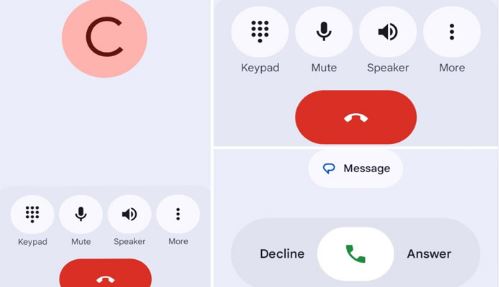
According to reports from users, the familiar layout of the Phone app has changed. Tabs such as “Recents” and “Favorites” have vanished, replaced by a streamlined interface that only shows “Home” and “Keypad.” This abrupt change has sparked a wave of concern online, with users speculating everything from software glitches to hacking attempts.
Not a Bug—It’s a Feature
However, the reality is far less alarming. As confirmed by the BBC, this transformation is part of a broader, official update rolled out by Google. The tech giant is in the process of introducing a fresh design language called Material 3 Expressive, which aims to simplify user interfaces across its suite of Android applications.
With this update, Google has merged call history and favorite contacts into the newly designed “Home” tab—creating a more unified and minimal interface. The change is part of Google’s ongoing efforts to make apps faster, more intuitive, and visually consistent across the Android ecosystem.
More Changes on the Way
The Phone app isn’t the only one getting a facelift. Google has confirmed that other core apps—including Gmail, Photos, Notifications, Themes, and even the Wear OS watch interface—will soon adopt the same design principles.
Online Confusion Sparks Misinformation
The sudden arrival of the new interface, without clear communication or update prompts, led many users to fear the worst. Screenshots circulated on social media were labeled as potential malware or unauthorized system access. But experts assure that the update is completely safe, authentic, and issued directly by Google through its official update channels.
What Can You Do if You Don’t Like It?
While there’s no official way to revert to the older design, users who prefer the previous interface have a few options:
-
Submit feedback to Google through the app settings.
-
Switch to alternative dialer apps like Truecaller or Simple Dialer.
-
Attempt to install an older APK version of the Google Phone app (not recommended for casual users).